
Why Is My Mac Running So Slow?
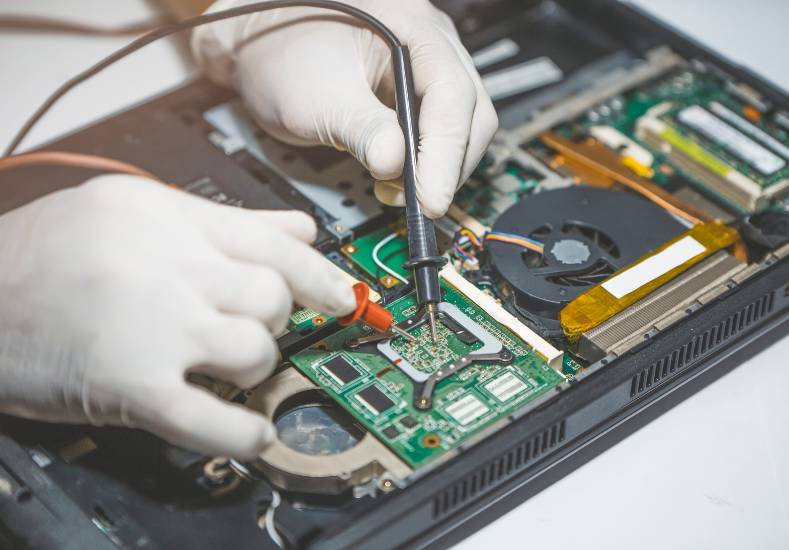
There are few things more disruptive to a productive day than a Mac that used to run quickly and smoothly suddenly taking forever to open applications, stuttering during basic tasks, or spinning the beach ball cursor at every turn. It's a problem that tends to creep up gradually rather than happening all at once, which means many Mac users adapt to the slowness over weeks or months before realising just how far performance has dropped from where it used to be. A slow Mac doesn't necessarily mean the machine is old or needs replacing, and in many cases the underlying causes are identifiable and fixable without needing new hardware at all. Understanding what typically drives performance degradation in macOS is the most useful starting point for working out whether the solution is a software cleanup, a hardware upgrade, or something more specific that needs professional attention.
What Usually Causes a Mac to Slow Down Over Time
Mac performance degradation rarely has a single cause, and in most cases it's the combination of several factors working together that pushes the machine from comfortably usable to noticeably sluggish. Storage that has filled up close to capacity is one of the most common contributors, since macOS relies on free disk space to create virtual memory and temporary files during normal operation, and when that space becomes limited the system has to work significantly harder to manage basic tasks. A large accumulation of login items and startup applications, each of which loads silently in the background when the Mac boots, consumes RAM and processing power from the moment the machine starts up, leaving fewer resources available for the applications you're actually trying to use. Outdated macOS software can also contribute to performance issues, particularly when security patches and optimisations included in newer versions haven't been applied. Background processes from applications that aren't actively being used but continue running in the background are another frequent drain on system resources that builds up gradually over time.
Hardware Limitations That Slow Older Macs Down
Beyond software and storage issues, hardware limitations play an increasingly significant role in Mac performance as machines age. RAM that was adequate when the Mac was new can become a bottleneck as applications grow more demanding with each update, causing the system to rely heavily on virtual memory and producing the kind of sluggishness that no amount of software cleanup fully resolves. A traditional hard drive that has been in use for several years can develop slower read and write speeds as it ages, and in some cases early signs of drive failure manifest as general system slowness before more obvious symptoms appear. Thermal throttling, where the Mac's processor automatically reduces its performance to prevent overheating, is another hardware-related cause of sudden or persistent slowness that often goes undiagnosed, particularly in laptops where dust accumulation in the cooling system has reduced airflow over time. For Mac users in the area wanting a proper assessment of what's behind their performance issues, professional Mac Repairs Seaford provides the diagnostic tools and experience to distinguish between a software issue and a hardware limitation accurately.
What Our Seaford Customers Are Saying About Same Day Mac Repairs
"My MacBook Pro had been getting slower and slower for about six months to the point where it was taking several minutes just to open basic applications and the fan was running constantly. I'd tried clearing out files and restarting more regularly but nothing seemed to make much difference. I took it to Same Day Mac Repairs and they ran a full diagnostic and found that the cooling system was completely clogged with dust which was causing the processor to throttle itself, and that the hard drive was showing early signs of failure. They cleaned out the cooling system, replaced the drive with a solid state upgrade, and transferred everything across. The difference is honestly remarkable, it runs faster now than it did when it was new. Couldn't be happier with the result and the service throughout."
— Michael T., Seaford
⭐⭐⭐⭐⭐
Steps Worth Trying Before Seeking Professional Help
There are several things worth attempting at home before concluding that professional repair is needed. Checking available storage and clearing out files, downloads, and applications that are no longer needed is a useful first step, since freeing up storage space gives macOS more room to operate and can produce a noticeable improvement when the drive has been running close to capacity. Reviewing and reducing login items through System Settings can free up RAM and processing power from the moment the Mac starts, making the overall experience feel more responsive. Running macOS software updates ensures the system is running the latest optimisations and security patches rather than an older version that may have known performance issues. Restarting the Mac regularly rather than relying on sleep mode clears accumulated temporary files and resets background processes that can consume resources over extended uptime periods. Activity Monitor, which is built into macOS, can also identify specific applications or processes that are consuming an unusually high proportion of CPU or RAM and point toward the source of the slowness.
When a Software Cleanup Isn't Enough
If working through the software-based steps above produces only temporary improvement or no noticeable difference at all, the problem is likely rooted in hardware rather than software configuration. A Mac that slows down significantly under moderate workloads, runs its fan at high speed consistently, or takes an unusually long time to boot even after a clean software environment has been established, is showing signs of a hardware limitation or fault that software adjustments alone cannot address. Upgrading RAM on Mac models where it remains user accessible, or replacing a traditional hard drive with a solid state drive, are hardware changes that can dramatically transform the performance of an older Mac and extend its useful life by several years at a fraction of the cost of a new machine. On newer Mac models where internal components are not user accessible, professional assessment is needed to determine whether a repair or upgrade is viable.
Conclusion: Getting Your Mac Running Quickly Again With Same Day Mac Repairs
A slow Mac is a genuinely frustrating problem to live with day to day, but in most cases it's a problem with identifiable causes and practical solutions rather than an inevitable sign that the machine needs replacing. Storage management, login item cleanup, software updates, and regular restarts address the most common software-side contributors to performance degradation and are worth working through systematically before drawing any conclusions about the hardware. When those steps don't restore the responsiveness the Mac used to have, hardware factors including thermal throttling from dust accumulation, insufficient RAM, or an ageing hard drive are the most likely explanation, and these are areas where professional diagnosis makes a real difference to getting the right solution rather than the wrong one. Same Day Mac Repairs can assess both the software environment and the hardware condition of your Mac, identify exactly what's holding performance back, and carry out the right repair or upgrade to get your machine running the way it should be again.

 English
 Arabic
 French
 Spanish
 Portuguese
 Deutsch
 Turkish
 Dutch
Dutch
 Italiano
 Russian
 Portuguese (Brazil)
 Greek
Greek